When your website goes dark or crawls to a halt, it's more than an inconvenience – it's a reputation hit, a sales killer, and a frustrating experience for everyone involved. In today’s hyper-connected world, Content Delivery Networks (CDNs) for Enhanced Availability aren't just a nice-to-have performance booster; they're a critical line of defense against outages, slow loading times, and the unpredictable nature of the internet itself. Think of it as your digital safety net, ensuring your content remains accessible, fast, and reliable, no matter what storms brew.
This isn't about mere speed; it's about resilience. It's about building a web presence that stands strong when a distant server hiccups, when traffic surges unexpectedly, or when malicious actors try to bring you down. If you've ever grimaced at a "404 Not Found" error or watched a loading spinner endlessly churn, you already understand the profound impact of poor availability. CDNs promise a better way, offloading the burden from your primary servers and spreading your digital assets across a global network, ready to leap into action when needed most.
At a Glance: Why Your Uptime Depends on a CDN
- Global Reach: CDNs distribute your website's content (images, videos, HTML, CSS, JavaScript) across servers worldwide.
- Speed & Performance: By serving content from the server closest to the user, CDNs drastically reduce load times and latency.
- Enhanced Availability: If your origin server (your primary host) experiences issues, cached content at the CDN's edge servers often remains accessible.
- Traffic Offloading: CDNs absorb the bulk of user requests, significantly reducing the load on your origin server, preventing it from being overwhelmed.
- Security Boost: Many CDNs offer built-in DDoS protection, WAF (Web Application Firewall), and SSL/TLS encryption, adding layers of security.
- Scalability: Easily handle traffic spikes and growth without needing to over-provision your own infrastructure.
- Cost Efficiency: By offloading traffic, you can often reduce bandwidth costs from your primary hosting provider.
The Availability Imperative: Why Uptime is Everything
In the digital realm, "availability" is simply whether your website or application is accessible and functional when a user tries to reach it. For content-driven web apps, e-commerce stores, SaaS platforms, or even a personal blog, consistent availability isn't just good practice—it's foundational to success.
Imagine running an online store. Every minute your site is down, you're not just losing potential sales; you're eroding customer trust. Shoppers, once frustrated, might not return. For a news site, an outage during a breaking story means missing out on crucial traffic and ad revenue. For a business-critical application, downtime can literally halt operations, costing companies millions.
Search engines, too, penalize sites with poor availability. If Google's crawlers frequently encounter errors or slow response times, your search rankings can suffer, further diminishing your visibility. In essence, availability is the bedrock of user experience, search engine optimization, and ultimately, your bottom line.
Your Origin Server's Achilles' Heel
Most websites are hosted on an "origin server" – a single (or clustered) physical or virtual machine that stores all your site's files and databases. When a user requests your site, their browser connects directly to this origin server to fetch the content. This model works fine for low-traffic sites, but it introduces several critical vulnerabilities that directly impact availability:
- Geographic Distance: The further a user is from your origin server, the longer it takes for data to travel, increasing "latency" and slowing down their experience.
- Single Point of Failure: If your origin server goes down (due to hardware failure, software bugs, power outages, or even simple maintenance), your entire site becomes inaccessible.
- Traffic Overload: A sudden surge in visitors (e.g., a viral marketing campaign, a news event, or a DDoS attack) can overwhelm your origin server, causing it to crash or respond so slowly that it's effectively unavailable.
- Security Vulnerabilities: Your origin server is a direct target for cyberattacks. If it's compromised, your site's availability and data integrity are at risk.
This is where Content Delivery Networks step in, fundamentally changing how your content reaches your audience and how resilient your online presence becomes.
The CDN Blueprint: How They Bolster Your Digital Fortifications
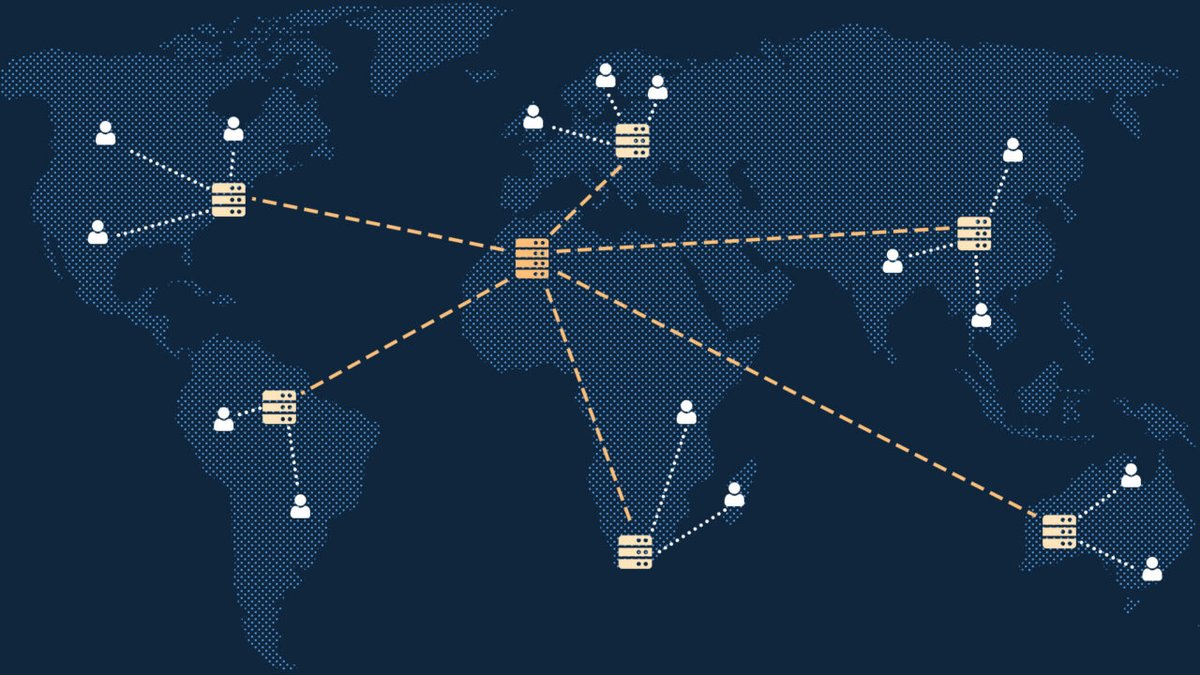
At its heart, a CDN is a globally distributed network of proxy servers, known as "edge servers" or "Points of Presence (PoPs)." These edge servers are strategically located in data centers around the world, closer to your users than your origin server.
Here’s a simplified breakdown of how this architecture dramatically enhances availability:
- Content Replication (Caching): When a user first requests content from your site (e.g., an image, a video, a CSS file), that request is intelligently routed to the nearest edge server in the CDN. If the edge server doesn't have a copy of that specific content yet, it requests it from your origin server. Once received, the edge server "caches" a copy of the content.
- Edge Delivery: Subsequent requests from users in that geographic region will be served directly from the cached content on the local edge server. This bypasses the need to travel all the way back to your origin server, significantly reducing latency and speeding up delivery.
- Traffic Distribution: Because user requests are spread across many edge servers, the load on any single server (including your origin) is drastically reduced. This prevents your origin from being overwhelmed by traffic spikes.
- Redundancy and Failover: This is where availability truly shines. If one edge server or even an entire data center experiences an outage, the CDN can automatically reroute user requests to the next nearest operational edge server. More critically, if your origin server becomes unavailable, the CDN's edge servers can continue serving the cached version of your content to users for a period, acting as a temporary "life support" system. This "last resort" delivery can keep your site partially or fully accessible during an origin outage, buying you crucial time to resolve issues.
- DDoS Mitigation: CDNs are often equipped with robust security measures designed to absorb and filter out malicious traffic from Distributed Denial of Service (DDoS) attacks. These attacks aim to overwhelm a server with a flood of illegitimate requests, making it unavailable to legitimate users. By sitting in front of your origin, the CDN can often detect and mitigate these attacks at the edge, preventing them from ever reaching your primary infrastructure.
Core Concepts to Grasp
- Origin Server: This is your primary web server where your website's original files and databases reside. It's the definitive source of truth for your content.
- Edge Server (or PoP): These are the CDN's distributed servers, strategically placed globally. They store cached copies of your content and serve them to nearby users.
- Caching: The process of storing copies of files (like images, videos, HTML, CSS, JavaScript) on edge servers so they can be delivered quickly without repeatedly fetching them from the origin.
- Latency: The delay before data transfer begins following an instruction. Shorter latency means faster page loads.
Implementing a CDN for Bulletproof Availability
Choosing and implementing a CDN isn't just a technical task; it's a strategic decision that directly impacts your service's resilience. Here's a practical roadmap to deploying a CDN for maximum availability.
1. Strategic Provider Selection
Not all CDNs are created equal. Your choice should align with your application's unique needs, especially regarding geographic reach and performance goals.
- Geographic Coverage: Does the CDN have PoPs in the regions where your target audience is concentrated? Wider global reach generally means better availability and performance.
- Feature Set: Look beyond basic caching. Consider DDoS protection, WAF, SSL/TLS management (free certificates are a plus!), intelligent routing, load balancing, and real-time analytics. Google Cloud CDN, for instance, offers fast, reliable global distribution by leveraging Google's extensive network infrastructure, integrating seamlessly with their other cloud services.
- Integration: How easily does it integrate with your existing hosting, CMS, or development pipeline?
- Support & Documentation: Reliable support is critical when things go wrong. Comprehensive documentation helps you configure and troubleshoot effectively.
- Pricing Model: CDN pricing is typically usage-based (data transfer, requests). Understand your expected traffic patterns to optimize costs.
2. Configuration Essentials for Resilience
Once you've chosen a provider, precise configuration is key to unlocking its availability benefits.
- DNS Setup: This is the most crucial step. You'll typically update your domain's DNS records (specifically CNAME records) to point to your CDN. This reroutes all incoming web traffic through the CDN rather than directly to your origin.
- Origin Server Definition: You'll tell the CDN where your origin server is located (its IP address or hostname) so it knows where to fetch content if it's not cached.
- Caching Rules: This is where you define what content gets cached and for how long (Time-To-Live or TTL). For enhanced availability, you want static assets (images, CSS, JS) cached for longer periods. Dynamic content (like user-specific data) may need shorter TTLs or specific rules to ensure freshness without sacrificing performance. Inadequate caching leads to slow performance and increased latency.
- SSL/TLS Encryption: Always implement HTTPS. Most CDNs offer free SSL certificates (like Let's Encrypt integration) or allow you to upload your own. This encrypts data in transit, protecting your users and boosting SEO. CDNs often handle SSL termination at the edge, further reducing the load on your origin.
- Security Policies: Configure WAF rules, DDoS protection settings, and rate limiting to shield your origin from attacks. This is a primary benefit for availability.
3. Rigorous Testing for Peace of Mind
Before fully deploying, thorough testing is non-negotiable.
- Asset Delivery Check: Verify that all your assets (images, scripts, stylesheets) are loading correctly through the CDN. Check for broken links or missing assets. Use your browser's developer tools to inspect network requests and confirm they're being served from the CDN.
- Cache Hit Rate: Monitor your CDN's analytics to understand your "cache hit rate"—the percentage of requests served directly from the CDN's cache. A high cache hit rate indicates efficient content delivery and less strain on your origin.
- Load Testing: Simulate high traffic scenarios to see how your CDN (and origin) handles the load. This helps evaluate the CDN's ability to efficiently distribute content during spikes, ensuring your application remains available even under stress.
- Failover Testing: If possible, simulate an origin server outage to confirm that the CDN continues to serve cached content. This is the ultimate test of its availability enhancement capabilities. Document these configurations, cache settings, and security policies for future reference and troubleshooting.
Best Practices for Maximizing CDN-Enhanced Uptime
A CDN is a powerful tool, but like any tool, its effectiveness depends on how you use it. Adhering to best practices ensures you're squeezing every drop of availability from your investment.
Smart Caching Strategies
Your caching strategy directly impacts both performance and availability.
- Optimize TTL (Time-To-Live): Static assets like images, CSS, and JavaScript files can often have long TTLs (days or weeks) because they don't change frequently. Dynamic content, or content that updates regularly (e.g., product prices), needs shorter TTLs or even no caching at all.
- Cache Invalidation: When you update content, you need a way to tell the CDN to clear its old cached copy and fetch the new one. This is called cache invalidation or purging. Most CDNs offer API calls or dashboard controls for instant invalidation. Regularly invalidating cached content when it changes prevents users from seeing stale versions.
- Cache Keys: Understand how your CDN generates cache keys (the unique identifier for cached content). Sometimes, URL parameters can create multiple cached versions of the same content, reducing efficiency. Configure rules to ignore unnecessary parameters.
- Server-Side Rendering (SSR): For certain applications, especially those requiring dynamic content or SEO benefits, using server-side rendering in conjunction with your CDN can provide a balance of freshness and performance.
Bolstering Security at the Edge
CDNs are your first line of defense; leverage their security features.
- DDoS Protection: Ensure your CDN's DDoS protection is configured and active. This is crucial for preventing availability-crippling volumetric attacks.
- Web Application Firewall (WAF): Many CDNs include WAF services that protect against common web vulnerabilities like SQL injection and cross-site scripting (XSS). This prevents attacks that could compromise your application's integrity and, by extension, its availability. Validate user input meticulously to prevent such vulnerabilities.
- Rate Limiting: Implement rules to limit the number of requests a single IP address can make within a given timeframe. This helps prevent brute-force attacks and abuse that could overwhelm your origin.
- Bot Management: Differentiate between legitimate bots (search engine crawlers) and malicious bots (scrapers, spammers) and manage their access to your site.
Proactive Monitoring and Analytics
You can't fix what you don't know is broken. Robust monitoring is essential.
- Cache Hit Ratio: As mentioned, a high cache hit ratio is a good indicator of efficient CDN operation. Track this metric closely.
- Origin Load: Monitor the CPU, memory, and network usage of your origin server. A well-configured CDN should significantly reduce these metrics during normal operations, providing headroom for unexpected spikes.
- Latency & Error Rates: Track end-user latency and error rates both from the CDN's perspective and your origin. This helps pinpoint performance bottlenecks or availability issues.
- Uptime Monitoring: Use third-party uptime monitoring services to independently verify your site's availability, ideally monitoring from multiple global locations.
Disaster Recovery Planning with a CDN
While a CDN significantly enhances availability, it's not a silver bullet. You still need a comprehensive disaster recovery plan.
- Origin Redundancy: Even with a CDN, consider having a redundant origin server or a highly available architecture for your primary infrastructure. If your origin is down for an extended period, the CDN's cached content will eventually expire.
- DNS Failover: Explore advanced DNS configurations that can automatically switch your DNS records to a backup origin if your primary one fails.
- Backup & Restore: Regular backups of your content and databases are non-negotiable. Ensure you can quickly restore your origin server if needed.
- Documentation: Document your CDN configuration, caching policies, and security settings meticulously. This is invaluable during troubleshooting or when onboarding new team members. Return to the main hub to review foundational documentation practices.
Common Questions and Misconceptions About CDNs and Availability
Let's clear up some lingering doubts about Content Delivery Networks.
"Are CDNs just for giant companies with millions of users?"
Absolutely not. While large enterprises certainly benefit, even small businesses and individual bloggers can gain significantly from a CDN. The availability and performance benefits scale down to any site that wants faster load times, better resilience, and protection against traffic spikes or localized outages. Many CDN providers offer affordable plans suitable for smaller operations.
"Do CDNs host my entire website, or do I still need a separate web host?"
A CDN doesn't replace your web host. Your origin server (your web host) remains the definitive source of your content and often handles your database and dynamic application logic. The CDN acts as an intermediary, caching and distributing copies of your static and semi-static assets. Think of it as a global distribution layer on top of your existing hosting infrastructure.
"Are CDNs always faster, even for local users?"
For the vast majority of users, yes. By serving content from the closest edge server, latency is drastically reduced. However, for a user who is geographically very close to your origin server, and if your origin server is already highly optimized and has low latency, the difference might be negligible. The real benefit comes from serving a diverse, global audience and offloading the work from your origin.
"If my origin server goes down, will my site stay up indefinitely thanks to the CDN?"
No, not indefinitely. While a CDN can serve cached content during an origin outage, this "grace period" is limited by the Time-To-Live (TTL) settings for your cached content. Once the cached content expires, the edge server will try to fetch new content from the origin. If the origin is still down, it won't be able to, and eventually, users will start seeing errors. The CDN offers a critical buffer, but it's not a permanent replacement for your origin.
"Is using a CDN complicated? I'm not a networking expert."
While a basic understanding of networking concepts (like DNS and caching) is helpful, most modern CDN providers offer user-friendly dashboards and extensive documentation that guide you through the setup process. Many providers abstract away much of the underlying complexity, making it accessible even for those without deep networking expertise. However, a development environment and some familiarity with HTML, CSS, JavaScript, and potentially Linux/Unix systems can be beneficial for deeper optimization and troubleshooting.
The Pitfalls to Skirt for Smooth Sailing
Even with the best intentions, missteps in CDN implementation can undermine your availability goals.
- Inadequate Caching: Not configuring appropriate TTLs for different content types can lead to stale content being served (if TTLs are too long) or your CDN constantly hitting your origin (if TTLs are too short), negating performance and availability benefits. This is a common issue that requires regular invalidation to address.
- Ignoring Security Features: Many CDNs come with powerful security tools (DDoS, WAF) that are often disabled by default or not fully configured. Failing to leverage these means you're leaving a significant availability defense unused. Security vulnerabilities are addressed by validating input and using secure protocols like HTTPS.
- Neglecting Monitoring: "Set it and forget it" is a recipe for disaster. Without active monitoring of cache hit rates, origin load, and error logs, you won't know if your CDN is performing optimally or if an issue is brewing that could impact availability.
- Underestimating Traffic Patterns: Misjudging your traffic volume or peak times can lead to unexpected overages on usage-based pricing plans, or worse, insufficient CDN resources during critical periods. Understand your traffic patterns to optimize costs and ensure readiness.
- Lack of Testing: Skipping load testing or, more critically, failover testing, leaves you vulnerable. You won't know if your CDN truly enhances availability until you simulate the very scenarios it's designed to protect against.
Your Next Steps: Building a Resilient Digital Foundation
Content Delivery Networks are no longer a luxury for the internet's giants. They are an essential component of a robust, highly available online presence for virtually any website or application that cares about user experience, SEO, and business continuity.
By intelligently distributing your content, absorbing traffic surges, and acting as a critical buffer against origin server failures and cyberattacks, CDNs fundamentally transform your digital infrastructure from a single point of failure into a globally resilient network. They empower you to confidently deliver your content to users worldwide, faster and more reliably, meaning fewer outages and more satisfied customers.
Your actionable path forward involves:
- Assessing Your Needs: Evaluate your current website's performance, audience geography, and potential availability risks.
- Researching Providers: Explore top CDN providers, comparing their features, global reach, and pricing models against your specific requirements.
- Strategic Implementation: Plan your CDN configuration meticulously, focusing on optimal caching strategies, robust security settings, and seamless DNS integration.
- Rigorous Testing & Monitoring: Don't launch without comprehensive testing. Once live, continuously monitor your CDN's performance and adapt your configurations as needed.
Investing in a CDN isn't just about speeding up your site; it's about fortifying your digital presence, ensuring that your valuable content is always just a click away, no matter what challenges the internet throws your way.